How to Choose the Best Panel PC for Your Business Needs?
In today’s fast-paced business environment, choosing the right technology can be challenging. A panel PC is a versatile solution for various business needs. These devices combine a display and computer in one unit, offering efficiency and space-saving advantages.
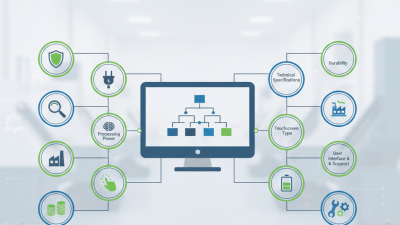
Selecting the best panel PC requires careful consideration. Factors like display size, processing power, and durability will heavily influence your choice. For instance, industries like retail may prioritize touchscreen features, while manufacturing might need robust designs for harsh conditions.
Understanding your specific needs is crucial. Not all panel PCs are created equal. Some models excel in performance, while others may struggle. It’s essential to evaluate both functionality and reliability. Investing time in research may reveal unexpected insights, leading to a more informed decision.
Understanding Panel PC Specifications for Business Applications
When selecting a panel PC for business applications, understanding specifications is crucial. Key specifications include processor speed, RAM, and storage type. A faster processor can improve performance in demanding tasks. Meanwhile, adequate RAM ensures smooth multitasking. Storage options vary; SSDs provide speed, while HDDs offer larger capacity at lower prices.
Additionally, consider the display size and resolution. A larger screen can enhance visibility for team collaboration. Resolution impacts clarity; higher resolution is often preferred in design or data-intensive fields. Pay attention to connectivity options too. USB, Ethernet, and HDMI ports can determine compatibility with existing systems.
While these specifications are important, personal business needs may not always align with available options. It’s common to compromise on certain features. For instance, a business might need robust performance but find limited choices in compact designs. Always reflect on actual usage scenarios when making a decision. Assessing practical needs will lead to a better fit for your organization’s goals and workflows.
Evaluating Processor Performance: Selecting the Right CPU for Efficiency
Choosing the right CPU for your panel PC is crucial for optimizing performance. Processor efficiency directly impacts productivity, power consumption, and system longevity. Reports indicate that a high-performance CPU can boost application responsiveness by as much as 30%. This is especially important in industrial settings where delays can lead to significant cost implications.
Evaluate the processor capabilities based on your specific tasks. For intense applications like data processing or graphics rendering, look for multi-core processors with high clock speeds. A report by Intel suggests that processors with more than four cores often handle multitasking better. However, it's essential to balance performance with energy efficiency. Some businesses overlook thermal output, which can affect system reliability.
Consider future applications as well. Investing in a slightly more capable CPU may seem costly now, but it could save money in upgrades later. Many companies face compatibility issues down the road due to under-specification. An inadequate processor may hinder software advancements and operational growth. It's vital to reflect on how your business needs may evolve. Balancing current performance and future adaptability is key.
Display Considerations: Choosing the Optimal Screen Size and Resolution
When selecting a panel PC, the screen size and resolution are crucial factors that can impact your business operations. Consider the environment where the PC will be used. For example, a warehouse may require a larger display for visibility from a distance. A 15-inch screen may suffice for desk work. However, in spaces with multiple users, consider larger sizes, like 22-inch or bigger.
Resolution plays a significant role in how information is presented. Higher resolutions, like Full HD, make text clearer and images sharper. This is vital for tasks requiring detailed visuals or precise data entry. But don’t overlook the downside: higher resolutions may demand more graphical power, complicating integration. Sometimes, lower resolutions may be adequate for simple tasks, saving costs in both equipment and energy.
Ultimately, the decision shouldn't just focus on displays’ numerical specifications. It requires understanding your team’s workflow and preferences. Testing different configurations can provide valuable insights. Reality check: often, what looks good on paper may not translate to user satisfaction. Engaging with employees about their needs can guide better choices and improve productivity.
Assessing Connectivity Options: Ensuring Compatibility with Existing Systems
When selecting a panel PC, assessing connectivity options is crucial. Compatibility with existing systems can significantly impact efficiency. A seamless integration reduces workflow disruptions and enhances productivity. Various interfaces, like USB, HDMI, and Ethernet, should align with your current hardware. Evaluate your existing devices before choosing a panel PC. Understanding these connectivity features will help optimize performance.
Not all panel PCs support the same protocols. Some may lack specific ports that your systems require. This might lead to unexpected issues and added costs. It's essential to analyze your organizational needs thoroughly. Consider potential upgrades or changes in technology in the near future. This foresight will inform your decision, ensuring a more resilient investment.
Sometimes, businesses underestimate the importance of firmware compatibility. Ensure the chosen model receives regular updates. Neglecting this aspect can lead to vulnerabilities and software issues. Additionally, consider the physical space for installation. A well-planned setup contributes to better access and maintenance. Thoughtful consideration of these details may reveal areas for improvement in your chosen configuration.
Durability and Environment: Selecting Panel PCs for Harsh Conditions
In industries where equipment faces tough conditions, choosing a durable panel PC is crucial. According to a report by VDC Research, nearly 45% of panel PCs are deployed in environments with extreme temperatures or humidity. Such conditions can lead to equipment failure if not properly considered. Selecting panel PCs with robust enclosures, high IP ratings, and enhanced cooling features is essential for ensuring reliability.
Temperature fluctuations can cause significant wear on electronic components. Devices that can operate in temperatures ranging from -20°C to 60°C are more valuable. Additionally, vibration and dust exposure further complicate equipment performance. Studies indicate that panel PCs built for industrial use often feature vibration resistance, which is vital for maintaining operational integrity in manufacturing settings.
It’s important to remember that not all ruggedized devices perform equally. Regular testing and scrutiny are necessary to determine their true durability. Continuous exposure to harsh environments can reveal weaknesses not highlighted in specifications. Therefore, frequent evaluations are essential to ensure selected panel PCs withstand the rigors of demanding workspaces, offering long-term reliability and efficiency.